Summer Heat Is Killing Your Gaming Laptop's Performance — Here's the Science and the Fix

The Season Nobody Talks About in Benchmark Reviews
Every gaming laptop review you have ever read was almost certainly conducted in a climate-controlled lab, at a comfortable 68 to 72 degrees Fahrenheit, with optimal airflow. That is not your living room in July. Across the Sun Belt, the Pacific Southwest, and increasingly the Upper Midwest, summer ambient temperatures routinely push indoor environments well above 80°F — even with air conditioning running. What happens to your machine inside those conditions is a story that benchmark sheets simply do not tell.
Performance degradation in high-heat environments is not a single event. It is a cascade. Understanding each step in that cascade is the first requirement for doing anything meaningful about it.
What Thermal Throttling Actually Is — and What It Is Not
Most gamers have encountered the term "thermal throttling" and understand it loosely as the processor slowing down when things get hot. That definition is accurate but incomplete. Modern CPUs and GPUs operate within a defined thermal envelope — a range of temperatures inside which the silicon can sustain its rated clock speeds without degrading or failing. Once internal sensor readings approach that ceiling, the chip's firmware reduces clock frequency to bring heat generation down. The result is a measurable drop in processing throughput.
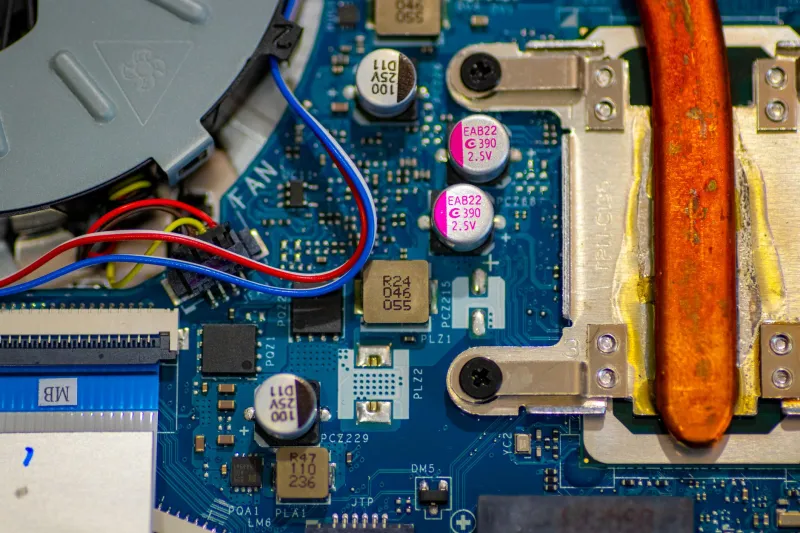
What that explanation leaves out is the role ambient temperature plays in setting the baseline for the entire system. Your laptop's cooling solution — heat pipes, vapor chambers, and fans — works by transferring heat from the chip to the surrounding air. When that surrounding air is already at 85°F instead of 70°F, the thermal differential between the chip and the air is narrower. The cooling system has to work significantly harder to move the same amount of heat. Fans spin faster, noise increases, and the system still reaches throttle thresholds sooner than it would in a cooler room.
In practical terms, a gaming laptop that sustains 80 frames per second in a benchmark conducted at 70°F may deliver 62 to 68 frames per second running the same workload in an 85°F room — not because anything broke, but because thermodynamics changed the operating conditions.
The Cascading Effects Beyond the CPU and GPU
Frame rate reduction is the most obvious symptom, but it is far from the only one. Elevated ambient temperatures affect the entire platform in ways that compound one another.
Memory and storage performance both degrade at elevated temperatures. LPDDR5 and DDR5 memory modules operate with tighter tolerances than their predecessors, and sustained heat can cause subtle timing instability that the system compensates for by introducing additional latency. NVMe SSDs throttle their own write speeds when internal temperatures climb — a process that is invisible to the user until load times and shader compilation pauses become noticeably longer.
Battery longevity accelerates its decline in heat. Lithium-ion chemistry degrades faster when the cell temperature is elevated during charge and discharge cycles. Running a demanding game on battery during a hot summer afternoon is one of the most effective ways to permanently reduce a battery's long-term capacity.
Sustained boost clocks become nearly impossible to maintain. Modern processors rely on short-duration power spikes — Intel's Turbo Boost and AMD's Precision Boost — to deliver peak performance during brief intensive loads. In cooler conditions, the system can sustain those boosts for several seconds before thermal limits intervene. In hot ambient conditions, the thermal headroom for those boosts shrinks dramatically, and the processor retreats to its base clock far more quickly.
Debunking the Most Common Myths
Before moving to solutions, two persistent misconceptions deserve direct attention.
Myth one: Closing background applications will fully restore throttled performance. Reducing CPU load helps, but it does not change the ambient temperature that is constraining your cooling system's effectiveness. Background process management is worthwhile general hygiene, but it is not a thermal solution.
Myth two: Your laptop's performance problems in summer are a sign of a failing machine. This is perhaps the most damaging myth because it drives unnecessary repair spending or premature replacement. A laptop performing below its winter benchmarks during a July heat wave is behaving exactly as designed. The thermal protection firmware is functioning correctly. The machine is not broken.
Actionable Cooling Strategies Ranked by Effectiveness
The following approaches are ordered from highest to lowest impact, accounting for both performance recovery and practical feasibility in typical US home environments.
1. Control the ambient environment first. No cooling pad or undervolting tweak will outperform a room that is actually cooler. If your home has central air conditioning, prioritize the room where you game. A 10-degree reduction in room temperature can recover a meaningful portion of the performance lost to thermal constraints. In climates like Phoenix or Houston, where outdoor temperatures exceed 105°F, this is not optional — it is foundational.
2. Elevate the laptop and maximize airflow beneath it. Gaming laptops draw the majority of their intake air through the bottom panel. A flat desk surface restricts that intake significantly. A quality laptop stand that raises the machine two to three inches and exposes the full intake surface can reduce CPU package temperatures by 4 to 8 degrees Celsius under sustained load — a meaningful margin in thermally constrained conditions.
3. Repaste the CPU and GPU thermal interface. Factory-applied thermal paste on gaming laptops is frequently adequate but rarely optimal, and it degrades over 12 to 24 months of regular use. Replacing it with a high-quality compound — particularly a liquid metal formulation, where the laptop design permits — can reduce die temperatures by 10 to 20 degrees Celsius in some systems. This is the single highest-impact hardware intervention available and is appropriate for any machine that is more than one year old.
4. Configure a custom fan curve. Most gaming laptop manufacturers provide software utilities — ASUS Armoury Crate, Lenovo Vantage, MSI Center — that allow users to define fan speed relative to temperature. Default profiles are tuned for quiet operation, not thermal management. Shifting to a more aggressive fan ramp in summer months sacrifices acoustic comfort for meaningful temperature headroom.
5. Undervolting through manufacturer-approved utilities. Where platform security settings permit, reducing the voltage supplied to the CPU at a given clock speed lowers heat generation without reducing performance. Tools such as Intel's Extreme Tuning Utility and AMD's Ryzen Master provide accessible interfaces for this adjustment. The thermal benefit varies by chip and silicon quality but commonly ranges from 5 to 12 degrees Celsius.
6. Use a powered cooling pad as a supplemental measure. Cooling pads are frequently oversold as primary solutions and are best understood as incremental supplements. A well-designed unit with high-static-pressure fans positioned to align with intake vents can contribute an additional 3 to 6 degrees Celsius of relief — useful, but not transformative on its own.
A Note on Climate-Specific Priorities
Users in humid climates — the Gulf Coast, the Southeast, the mid-Atlantic — face an additional variable. High relative humidity reduces the efficiency of convective cooling and can introduce condensation risk if a laptop is moved abruptly from a heavily air-conditioned space to outdoor conditions. In these environments, maintaining a stable indoor temperature and avoiding rapid thermal transitions is particularly important.
Users in dry, high-altitude climates — Colorado, Nevada, New Mexico — will find that dust accumulation in cooling fins accelerates significantly. Quarterly compressed air cleaning of intake and exhaust vents is a practical maintenance step that should become seasonal habit.
Performance Is Not Fixed — It Is a Function of Environment
The central insight this analysis offers is that a gaming laptop's performance specification is not a constant. It is a range, and ambient temperature is one of the primary variables that determines where within that range your system operates on any given day. Managing that variable intelligently — through environmental control, hardware maintenance, and software configuration — is a legitimate and effective form of system optimization. The tools are accessible, the science is well understood, and the performance recovery is real.